Automatic replies and opening hours
Last updated: October 21, 2026
When someone messages you and nobody is free to answer, Broadcaster can reply for you straight away: one message during the working day saying you will get back to them, and a different one when you are shut saying so. Both are set up on the Company page, and both depend on the opening hours you set there. The Owner and Admins can open that page.
Set your opening hours
Open Company in the left-hand menu and scroll to Normal Business Operating Hours. Tick the days you work, set the hours, and choose your timezone. Everything that depends on whether you are open or closed reads these: automatic replies, the messages that mention your hours, and the schedule screens.
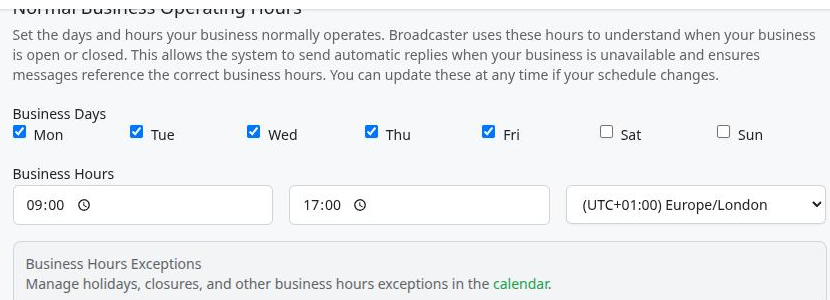
A bank holiday or a day off is an exception. Under Business Hours Exceptions, the word calendar is a link: on the calendar, press Exceptions, then Add New Exception, choose Holiday, Emergency Closure or Other, and press Add Exception. A closure counts as closed for the whole of that day, so anyone who messages you on it gets the closed reply.
Turn automatic replies on
Under Auto Response Settings are two switches, one for each reply:
- Outside Business Hours Response sends the closed reply to anyone who messages while you are shut.
- During Business Hours Response sends the “we will get back to you” reply to anyone who messages while you are open.
Either can be on without the other. A business that answers quickly during the day and only wants people told when it is shut leaves the first on and the second off.
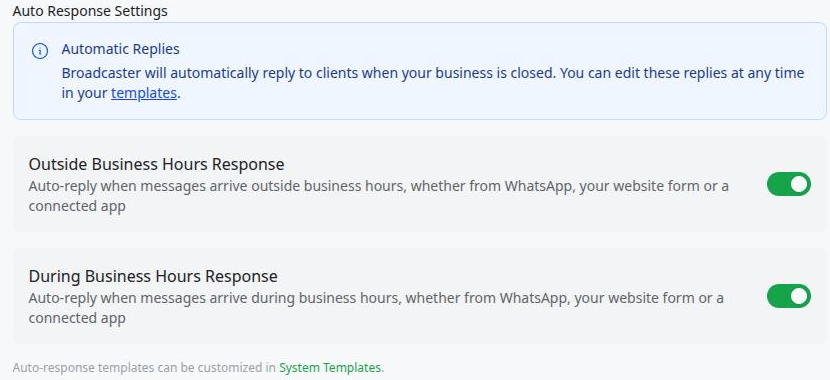
The switches cover every way a message can reach you: a WhatsApp message to your business number, an enquiry from your website contact form, and an enquiry sent in by a connected app. If a reply has stopped arriving where you expected one, this is the first place to look.
A website enquiry gets the replies chosen for that contact widget, under Automatic replies in the widget’s settings. An enquiry from a connected app gets the replies that app asks for.
Change the words
The two WhatsApp replies are on the Quick Replies page, in the Automatic box: Business Hours Response and Outside Business Hours Response. Edit them like any other quick reply. They are not sent to WhatsApp for approval, because an automatic reply only ever goes inside a conversation the contact has just opened, where an ordinary message is allowed.
Keep them short and say what happens next: when you will reply, or what to do if it is urgent.
How often a reply goes out
Nobody wants the same automatic message three times in an afternoon, so Broadcaster keeps count:
- During the day, once a day. The first message a contact sends you in a working day gets the reply. Anything more they send that day does not.
- While you are shut, once per closed stretch. Someone who messages on Friday evening, again on Saturday and again on Sunday gets one closed reply, not three. The count starts again when you next open and close.
- Each way in counts on its own. A contact who messages your WhatsApp number and also fills in your website form gets a reply to each.
- The two are independent. Someone who asks at 4:30pm and again at 6:30pm gets both: the daytime reply, then the closed one.
- A reply from you turns it off for that period. Once a member of the team has answered a contact by hand, no automatic reply lands on top of the conversation until the next period starts.
- Replies to a reminder or a campaign still count. A contact answering a reminder you sent, or a campaign, is acknowledged like anyone else.
Common gotchas
- An automatic reply does not mark the enquiry as read. The conversation stays unread in the Live Feed until a person opens it, so an enquiry that only got the automatic reply is never lost among the handled ones.
- Nobody is greeted twice for answering the greeting. A contact who replies to the automatic reply does not get another one the same day, or in the same closed stretch.
- A closure applies on the day you enter it. Add the bank holiday on its own date.
- Website and app enquiries used to get a reply every time. They now follow the same rules as WhatsApp messages, including the switches above. If you turned the daytime switch off long ago, enquiries from your form stopped getting a daytime reply when this changed.
Written by Document Manager